isostation m5 Ubiquiti
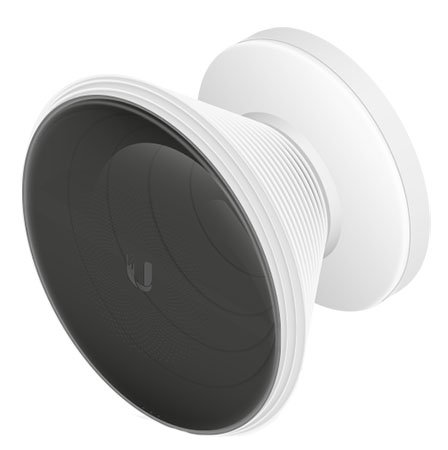
With a die-cast aluminum base and interchangeable antenna, the IsoStation™ is available in two models and brings increased performance to your network using technology that isolates beam communications between your devices. The IsoStation M5 delivers throughput speeds of up to 150+ Mbps.
KSh14,000.00
isostation m5 Ubiquiti
Modular Design
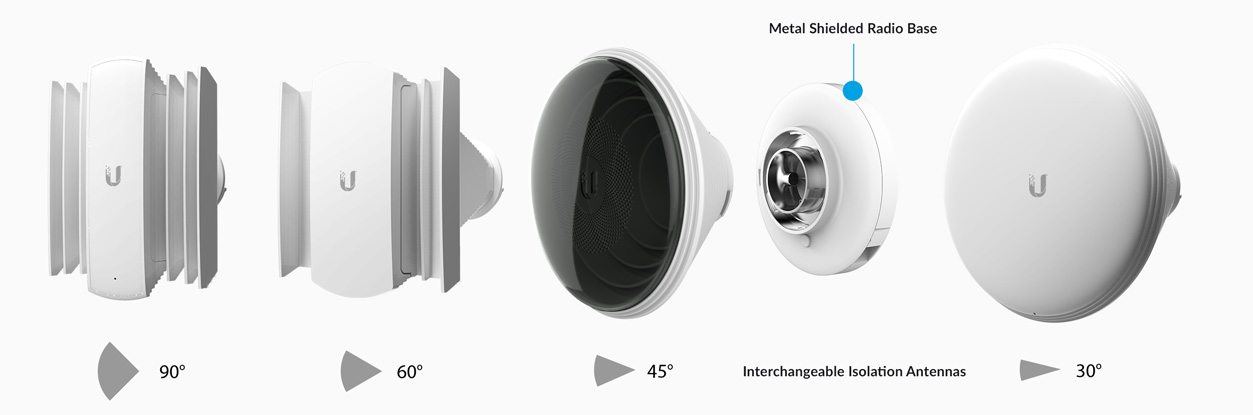
The antenna horn is interchangeable and helps with beam-shaping for specific deployment and environment needs. The IsoStation TM also gets maximum gain out of the smallest footprint.
Beam Performance Perfected
The IsoStation TM can use a variety of horn antenna sectors designed for increased co-location performance without sacrificing gain. Its unique beam performance and superb co-location characteristics allow for a higher density of sectors than traditional sector technology.https://netpointtechnologies.co.ke/product-category/networking-equipments/ubiquiti-products/
Enhanced Co-Location
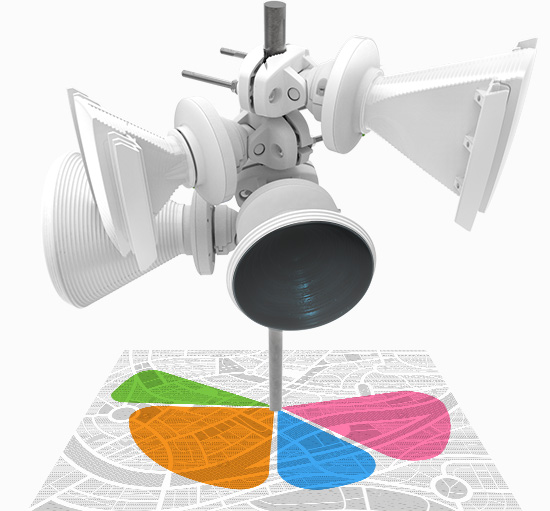
Asymmetrical horn antenna options (60° and 90°) have naturally attenuated side lobes and extremely low back radiation, and they offer industry-leading front-to-back ratio and low side lobe radiation. Symmetrical horn antennas (30° and 45°, the default) are ideal for cluster sector installations with high co-location requirements.
Improved Noise Immunity
IsoStation TM blocks or spatially filters out noise, so noise immunity is improved. This feature is especially important in an area crowded with other RF signals of the same or similar frequency.https://www.ui.com/downloads/datasheets/IsoStation/IsoStation_M5_DS.pdf

Based on 0 reviews
Be the first to review “isostation m5 Ubiquiti” Cancel reply
Related products
-
Networking Equipment, Ubiquiti, Ubiquitti Wireless
Buy the best Ubiquiti UniFi AP AC PRO in kenya
0 out of 5(0)UniFi AP AC PRO specs
Technical Specifications
Mechanical
Dimensions Ø196.7 x 35 mm (Ø7.7 x 1.4″)
Weight Without mount: 350 g (12.4 oz),
With mount: 450 g (15.9 oz)Hardware
Networking interface (2) GbE RJ45 ports
Management interface Ethernet
Power method PoE
48V Passive PoE
Power supply UniFi PoE switch
48V, 0.5A PoE adapter (Included)*
*5-packs do not come with PoE adapters.
Supported voltage range 44—57V DC
Max. power consumption 9WMax. TX power
2.4 GHz
5 GHz
22 dBm
22 dBm
MIMO
2.4 GHz
5 GHz
3 x 3
3 x 3Throughput rate
2.4 GHz
5 GHz
450 Mbps
1300 Mbps
Antenna gain
2 GHz
5 GHz
3 dBi
3 dBi
Button Factory reset
Mounting Wall/ceiling (Included)
Operating temperature -10 to 70° C (14 to 158° F)
Operating humidity 5 to 95% noncondensing
Certifications CE, FCC, ICSoftware
WiFi standards 802.11 a/b/g/n/ac
Wireless security WEP, WPA-PSK, WPA-Enterprise (WPA/WPA2, TKIP/AES)
BSSID 4 per radio
VLAN 802.1Q
Advanced QoS Per-user rate limiting
Guest traffic isolation Supported
Power save Supported
WMM Voice, video, best effort, and background
Concurrent clients 250+
Supported Data Rates (Mbps)
802.11a 6, 9, 12, 18, 24, 36, 48, 54 Mbps
802.11b 1, 2, 5.5, 11 Mbps
802.11g 6, 9, 12, 18, 24, 36, 48, 54 Mbps
802.11n 6.5 Mbps to 450 Mbps (MCS0 – MCS23, HT 20/40)
802.11ac 6.5 Mbps to 1300 Mbps (MCS0 – MCS9 NSS1/2/3, VHT 20/40/80)SKU: n/a -
Networking Equipment, Ubiquiti, Ubiquitti Wireless
Buy Litebeam ac gen2 in kenya
0 out of 5(0)Litebeam ac gen2, Ubnt litebeam range and specs.
Ubiquiti Networks launches the latest generation of airMAX® CPE (Customer Premises Equipment), the Litebeam ac , with dedicated Wi-Fi management. Improved Noise Immunity .
The LiteBeam 5AC Gen 2 directs RF energy in a tighter beamwidth. With the focus in one direction, the LiteBeam ac gen2 range blocks or spatially filters out noise, so noise immunity is improved. This feature is especially important in an area crowded with other RF signals of the same or similar frequency.
Innovative Design Ubiquiti’s InnerFeed® technology integrates the radio into the feedhorn of an antenna, so there is no need for a cable. This improves performance because it eliminates cable losses. Featuring high performance and innovative mechanical design, the LiteBeam 5AC Gen 2 is versatile and cost-effective to deploy.
SKU: n/a -
Networking Equipment, Tp-link, TP-Link Antennas
TP Link AP300 AC1200 Wireless Access Point|flannetworks
Networking Equipment, Tp-link, TP-Link AntennasTP Link AP300 AC1200 Wireless Access Point|flannetworks
0 out of 5(0)TP Link AP300 AC1200 Wireless Access Point
AP300 Wireless Access Point offers Simultaneous 300Mbps on 2.4GHz and 867Mbps on 5GHz Wi-Fi speeds, ideal for HD streaming and online gaming. 2 dual band detachable antennas provide superior Wi-Fi coverage to eliminate “dead zones”. Beamforming technology delivers highly targeted and efficient wireless connections.
Gigabit Ethernet port provides gigabit-class Internet access or an ultra-fast connection for wired device. Dual Core 800MHz processor ensures great performance, even with more devices connected at the same time. Various operation modes, including AP, Repeater/Bridge, Client, and Multi-SSID, provide flexible solutions to meet the wireless needs in any situation.
SKU: n/a -
Networking Equipment, Ubiquiti, Ubiquitti Wireless
Buy UBNT UNIFI AC LR|flannetworks
0 out of 5(0)UBNT UNIFI AC LR
802.11ac Long Range Access Point
The UniFi AC LR AP features the latest Wi-Fi 802.11ac technology in a refined industrial design and is ideal for long-range deployment of high‑performance wireless networks.
Model: UAP‑AC‑LRSKU: n/a -
DLink, Networking Equipment
16-Port Smart Switch DGS-1100-16
0 out of 5(0)16-Port Smart Switch DGS-1100-16
16 Gigabit ports, 32 Gbps switching capacity. Auto Voice and Surveillance VLANs. QoS, Bandwidth control, IGMP Snooping. User friendly Web interface. Advanced power saving features. Fanless design for silent operation, 19-inch rackmountable, brackets included. Robust metal housing.
D-Link’s DGS-1100-16 is the newest addition to Smart Managed Switches featuring D-Link Green Technology. The DGS-1100-16 consists of sixteen 10/100/1000 Mbps ports and comes in a compact 11″ desktop/rackmount enclosure. Switch management can be performed through a web management interface or through the SmartConsole Utility.
SKU: n/a
Buy TP Link TL-WR740N Wireless N Router|flannetworks 


There are no reviews yet.