
Professional Resetting Ruijie Access Points: Complete Guide for Homes, Offices, Schools & Businesses in Kenya Leave a comment
Method 1: Resetting Ruijie Access Points Using the Physical Reset Button
This is the most common and effective method.
Steps:
Ensure the access point is powered on.
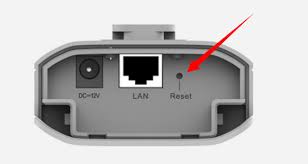
Locate the RESET button on the device.
Press and hold the RESET button using a pin or paperclip.
Continue holding for approximately 10–15 seconds.
Release the button when the LED indicators begin flashing.
Wait 2–5 minutes for the device to reboot.
The access point will return to factory default settings and all previous configurations will be erased.
Method 2: Reset Ruijie Access Point Through Ruijie Cloud
If the device is managed through Ruijie Cloud or Reyee Cloud:
Steps:
Log in to the Ruijie Cloud portal.
Select the target access point.
Navigate to Device Management.
Choose Factory Reset.
Confirm the reset operation.
Wait for the device to reboot and reconnect.
This method is ideal for remote management environments.
Method 3: Reset Through the Web Management Interface
If you still have access to the administration panel:
Steps:
Log in to the access point’s web interface.
Navigate to System Settings.
Select Maintenance or Device Management.
Click Factory Reset.
Confirm the action.
Allow the device to reboot.
The access point will return to default settings after restarting.
Default Configuration After Reset
After a successful factory reset:
All wireless SSIDs are removed.
Administrator passwords are cleared.
VLAN settings are deleted.
IP configuration returns to default.
Security policies are reset.
Mesh settings are removed.
You will need to reconfigure the device before reconnecting users.
